
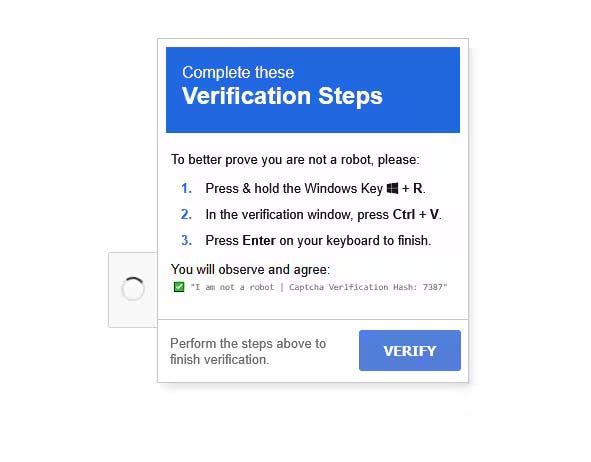
A real client incident, and what it teaches every business about the newest social-engineering trick in town.
“Should we be worried about this?”
That’s how this one started. Not with an alarm. Not with a ransom note. Just a quiet message from a client’s team: “Dave found that odd item on the bottom of his computer — should we be worried?”
It turned out they absolutely should have been. What Dave had spotted was a mapped network drive that had appeared out of nowhere in his File Explorer — something that looked vaguely legitimate but had no business being there. That small, easy-to-dismiss detail was the last visible trace of an attack technique that’s been quietly spreading across businesses over the past year: ClickFix.
What Actually Happened
Here’s the timeline, reconstructed after the fact by our security partners at Huntress:
Early one morning, while browsing on a personal device connected to the network, Dave landed on a page — most likely through a personal email link or a news site — that presented what looked like a routine “verification” step. A fake CAPTCHA. A “click here to confirm you’re human” prompt.
Instead of just clicking a button, the page walked him through copying a command and pasting it into the Windows Run dialog (the box you get from pressing Win + R).
That single paste-and-enter action kicked off a chain: PowerShell launched, which reached out over WebDAV — a protocol normally used for legitimate file sharing — to a remote server, and attempted to pull down and execute a malicious payload.
The whole thing played out in under three minutes. Bitdefender, running on the endpoint, caught and quarantined the malicious file about 180 seconds after it launched.
Dave, to his credit, noticed something wasn’t right and called us. That instinct — and the antivirus catching the payload before it could fully establish itself — is very likely the reason this stayed a “close call” instead of a full-blown breach.
The lingering evidence: a rogue mapped network drive pointing to an external WebDAV address, still sitting in his File Explorer the next morning. That’s the “odd item at the bottom of the screen” that triggered the original question.
Why This Attack Works So Well
ClickFix (also seen in the wild as ClearFake) is effective precisely because it doesn’t look like a hack. There’s no scary pop-up, no obvious malware download, no email attachment. It looks like the most boring, everyday thing on the internet: a CAPTCHA.
The trick is that it moves the “click” out of the browser and into a place most users have never thought to be suspicious of: the Windows Run dialog. Most employees have been trained — rightly — to be wary of email attachments and sketchy downloads. Almost nobody has been trained to be wary of copying and pasting a “verification code” into a system dialog box, because until recently, that wasn’t a meaningful attack vector.
It also piggybacks on infrastructure that already exists on every Windows machine: PowerShell and the WebDAV client. No new software needs to be installed for the attack to start doing damage — it borrows tools that are already trusted by the operating system.
Why It Almost Slipped Through
Three things saved this client:
Take any one of those three away, and this story likely ends differently.
What We Did Next
Once the call came in, our response followed a straightforward playbook:
Isolated the host immediately to stop any further communication in or out.
Engaged our SOC partner to pull retrospective forensics and confirm the scope (and non-scope) of what happened.
Removed the rogue mapped network drive and any related persistence artifacts.
Ran a full antivirus sweep of the machine before returning it to service.
Recommended password resets for anything stored on or used from that workstation, including the employee’s business email.
Restored the host to normal use only after confirming — not assuming — that the threat had been fully mitigated.
We also flagged something worth every business owner thinking about: this attack most likely originated from personal browsing or personal email on a company machine. That’s an extremely common and usually reasonable policy for small businesses to allow. But it does mean the line between “personal risk” and “business risk” gets thinner every year, and it’s worth having an honest conversation with your team about it — not to lock everything down, but to build the same instinct Dave had: notice the odd thing, and ask.
Three Takeaways for Your Business
1. Train your team on the new red flags, not just the old ones. “Never click a link in a suspicious email” is table stakes now. Add to that: never paste anything into the Windows Run dialog because a website told you to — legitimate verification steps never require it.
2. Antivirus alone is a floor, not a ceiling. Signature-based AV can catch a known bad file. It won’t tell you how it got there, whether it phoned home first, or whether anything else on the network is affected. That’s what layered detection and a real SOC review are for.
3. “It looked weird so I asked” is a security control. Seriously. The single highest-leverage thing that happened in this whole story was a non-technical employee noticing something off and saying so out loud, immediately, instead of shrugging it off. No tool replaces that. Every team should feel safe raising their hand the moment something looks even a little bit wrong.
Worried you might have blind spots like this in your own environment? P3C Technologies offers a free Level 1 Security Risk Assessment to help you find out before an attacker does. Give us a call at 262.423.6267 or reach out at support@p3ctech.com.