

Happy Friday! Here’s what’s on deck this week: a hardware tip that explains a slow laptop better than almost anything else, a real story off our helpdesk about a verification that verified nothing, a reminder about the planning meeting your contract already includes, a minute on picking the right process to automate, and a new section — a product we actually use.
Thank you for reading. Stay safe out there.
– Brad Otto
Tip of the week
Don’t Starve Your Laptop — Use the Charger It Came With
The wrong power adapter doesn’t just charge slowly. It underfeeds the machine. When a laptop can’t pull the wattage it expects, it protects itself by cycling down how much it will process — the CPU throttles, the fans spin up, and everything crawls. We have watched this happen more than once, and every time the owner was convinced the computer was dying. It wasn’t. It was starving.
The same thing happens two other ways. Docking stations have a fixed power budget, so every extra thing you hang off the dock — a phone charger, a desk fan, a USB coffee mug warmer — pulls from the same pool your laptop is trying to charge from. Load it up and the dock gets flaky and your battery never fills. We have also traced it to the wall itself, where too much was running on one circuit and clean power simply wasn’t getting delivered.
How to check that your charger is actually right:
• Read the label on the original adapter. Find the “Output” line and multiply volts by amps — 20V ⎓ 3.25A is 65W. Some bricks print the wattage outright.
• Match or exceed that number, never go under. A 45W charger in a 90W laptop will keep the lights on and throttle everything else.
• Check the laptop’s own label or the manufacturer’s spec page for the required wattage before you buy a replacement.
• With USB-C, the cable counts too. Anything above 60W needs a 100W (5A) rated cable — a cheap one silently caps your power.
• Watch for the warning signs: “plugged in, not charging,” “slow charger connected,” or a startup message that the adapter can’t be identified.
• Keep the dock for work gear. Charge phones, fans, and gadgets from a separate charging station.
Not sure what your machine needs? Send us the model and we’ll tell you.
Cybersecurity news
He Verified the Email Before Clicking. It Still Almost Got Him.
A client got a suspicious message from a business contact he has worked with for years. He did exactly what every security course tells you to do — he verified it with the sender. He opened a new email, asked “Did you send me this?”, and got an answer back: yes. So he proceeded.
The contact’s mailbox was already compromised. The intruder sitting in that account read the verification email and answered it himself. Verifying only works when the channel you verify through is independent of the channel you’re suspicious of, and a new message to the same address is the same mailbox controlled by the same attacker. What saved this one was not the verification — it was our proactive identity monitoring with Petra Security, which flagged the unauthorized access and locked the account down in minutes. The industry average for catching a business email compromise is measured in weeks.
The rule is simple: verify by voice, using a number you already had — from your own contacts, a past invoice, or a website you navigated to yourself. Never a number or link supplied by the message you’re questioning. The full article also covers the second case from that same week, where a client found an email in his junk folder that appeared to come from his own address, and what SPF, DKIM, and DMARC actually do about that.
Working with P3C
When Was the Last Time You Had a Review Meeting With P3C?
A few questions worth sitting with. Do you know how old your computers are, or the last time your networking gear was replaced? Have we reviewed your server’s warranty status? Do you remember which services you signed up for and what we do for you? Have you talked with us about new technology or the business goals you want to hit over the next year? Are you planning a major office move where the internet and phones have to work on day one?
If you are on a proactive IT contract, you are entitled to a proactive planning meeting with us — it is part of what you are already paying for. We send out reminders to grab a time, and more often than not they go unanswered. If it has been a while, email support@p3ctech.com and we’ll get a technology business review on the calendar.
The AI and Automation Minute
Automate the Boring, Documented, Repeatable Thing
The AI and automation projects that actually pay off all start in the same place: a process that is repeatable and already documented. Something well defined, with a clear beginning and end, that you do so often it has become annoying. If a task gets improvised differently every time, automating it just produces bad output faster — garbage in, garbage out. Write the process down first. If you can’t write it down, it isn’t ready to automate.
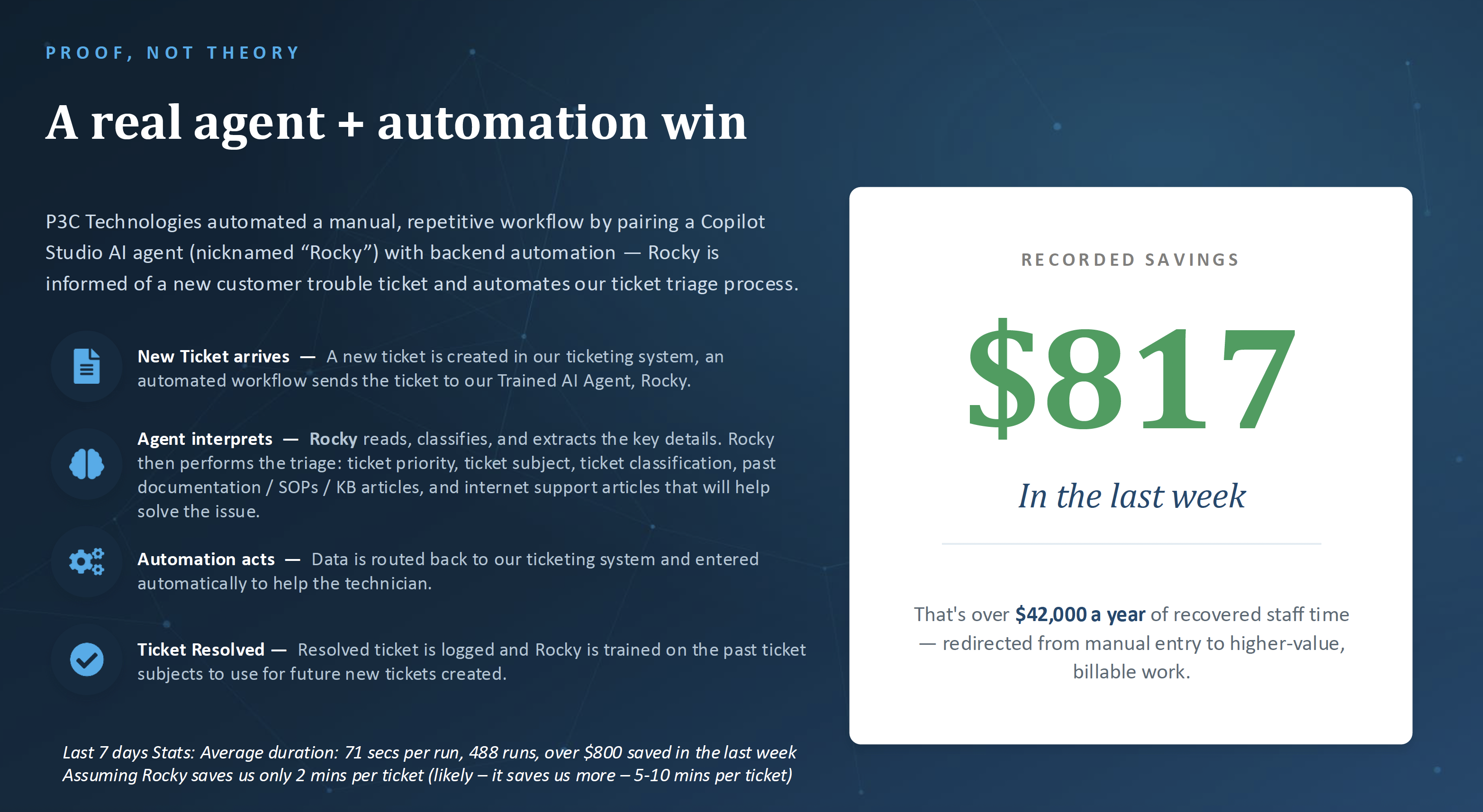
Here’s ours, running right now. We paired a Copilot Studio AI agent — we call him Rocky — with backend automation to handle ticket triage. A new ticket comes in, Rocky reads it, classifies it, sets priority and subject, and pulls the relevant SOPs, KB articles, and support documentation before a technician ever opens it. Last week that was 488 runs at about 71 seconds each, and $817 in recovered staff time. Annualized, that’s over $42,000 redirected from manual entry to billable work.
Want to find your version of this? Everything we’re building lives at ai.p3ctech.com — including Brad’s book Beyond the Prompt, a free AI Acceptable Use Policy you can download and adapt for your team, and our upcoming AI and automation events.
Product of the week
Anker Prime 200W Charging Station (6 Ports)
Straight out of this week’s tip: if your dock is buried under phone chargers and gadgets, give that stuff its own power source. This is the one Brad Otto uses to keep his tech charged.
• 200W total output across six ports — six devices charging in one spot.
• Two USB-C ports deliver up to 100W each at the same time. Anker rates it to take two 14″ MacBook Pros to 50% in about 28 minutes.
• Built-in safety system continuously monitors temperature while charging.
• Desk-sized, not travel-sized: about the width of an iPhone 17 at 4.4 × 3.0 × 1.4 in and 1.24 lb, so it stays put.
• Ships with a 5 ft AC cord, welcome guide, and a 24-month warranty.
One thing people skip and then regret: the cables. Anything above 60W needs a 100W-rated USB-C cable, or you paid for power you’ll never see. Don’t cheap out here.
See the Anker Prime charging station →
Get the 100W USB-C cables →
These are Amazon affiliate links. Your price is the same either way — we only recommend gear we actually use.

You’re receiving this because you’re a valued P3C client or partner.