
Cybersecurity Article of the Week
A fake Evite landed in our own inbox this week. It passed every email authentication check, and its link refuses to show itself to the tools built to inspect it.
On Tuesday morning, a message titled “You are invited” arrived from a personal Outlook.com address. It looked like a standard Evite: the Evite logo, a “View event” button and the usual row of RSVP tools underneath. There was just one problem. There was no event.
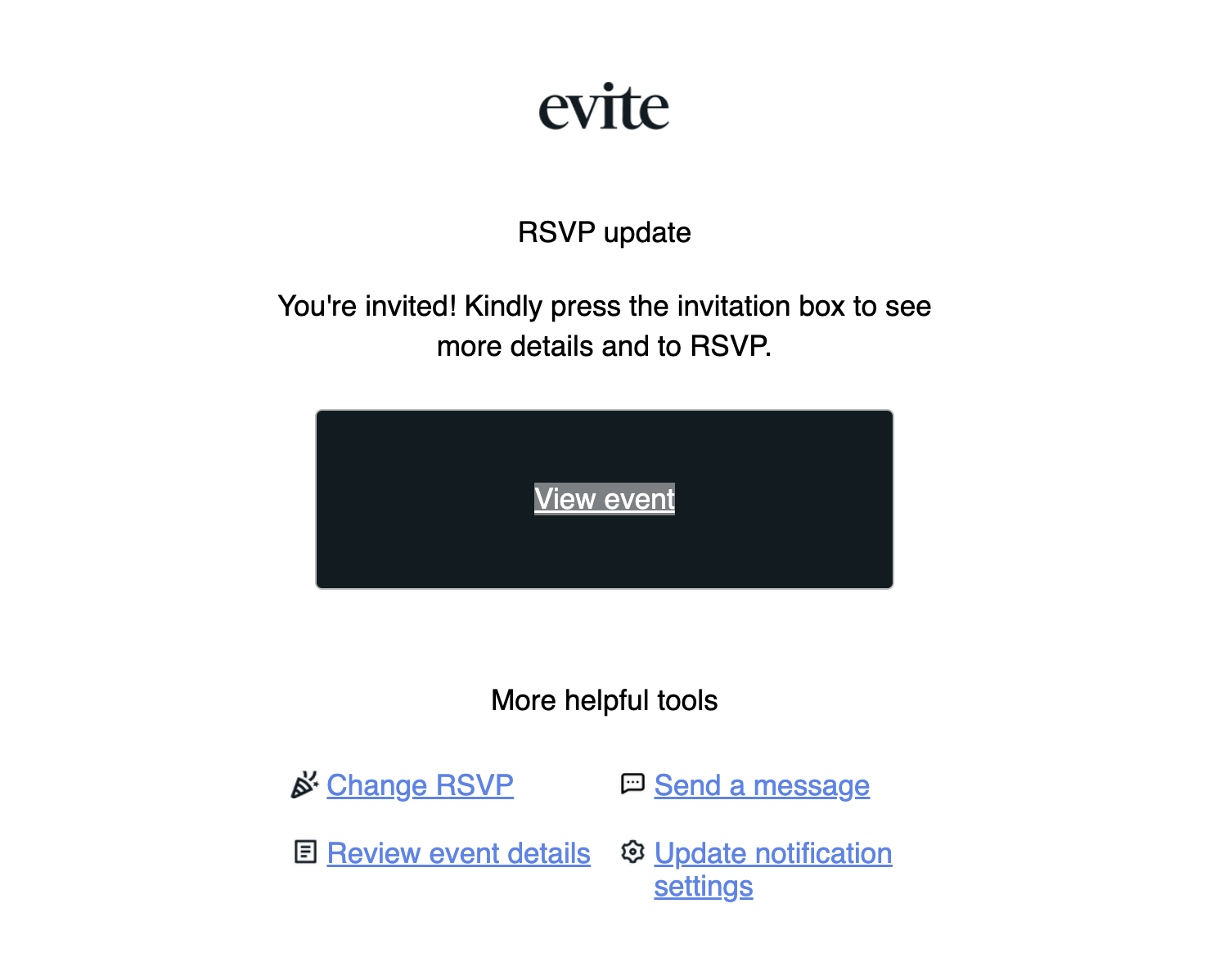
It came from a real account
Email systems use three checks, called SPF, DKIM and DMARC, to confirm that a message really came from where it claims. This one passed all three. That’s because it genuinely was sent through Microsoft’s Outlook.com servers, from a real person’s account.
The most likely explanation is that the account was taken over. The message had no “To” line at all, which means every recipient was hidden in BCC. That’s what it looks like when someone blasts a phishing email to an entire address book. If you received it, you received it because you’re in that person’s contacts.
The lesson: “it came from someone I know” and “it passed the security checks” are both true here, and the email is still malicious. Authentication tells you which server sent a message. It can’t tell you who was sitting at the keyboard.
It was built from a real Evite
When we pulled the message apart, we found leftovers from a genuine Evite invitation. The attacker had copied a real one, pasted it into a new email, and swapped the links.
But they didn’t swap all of them. The four small icons in the toolbar still point to the real evite.com. Hover over one, and everything looks fine. Every piece of text you’d actually click on, including “View event,” “Change RSVP” and “Review event details,” goes somewhere else entirely:
evitingforaboutthsummer[.]com/e-viteme/
It starts with “evit,” so a quick glance reads it as Evite. Look again and it’s a run-on, misspelled phrase that has nothing to do with Evite. (We’ve broken the link with brackets so nobody clicks it by accident.)
The link hides from security tools
This is the part that makes this one worth writing about. When we suspect a link is malicious, we send it to a scanning service such as urlscan.io. The service visits the page in a safe, isolated browser and shows us what’s there. This time, the scanner never saw a page. It got this instead:
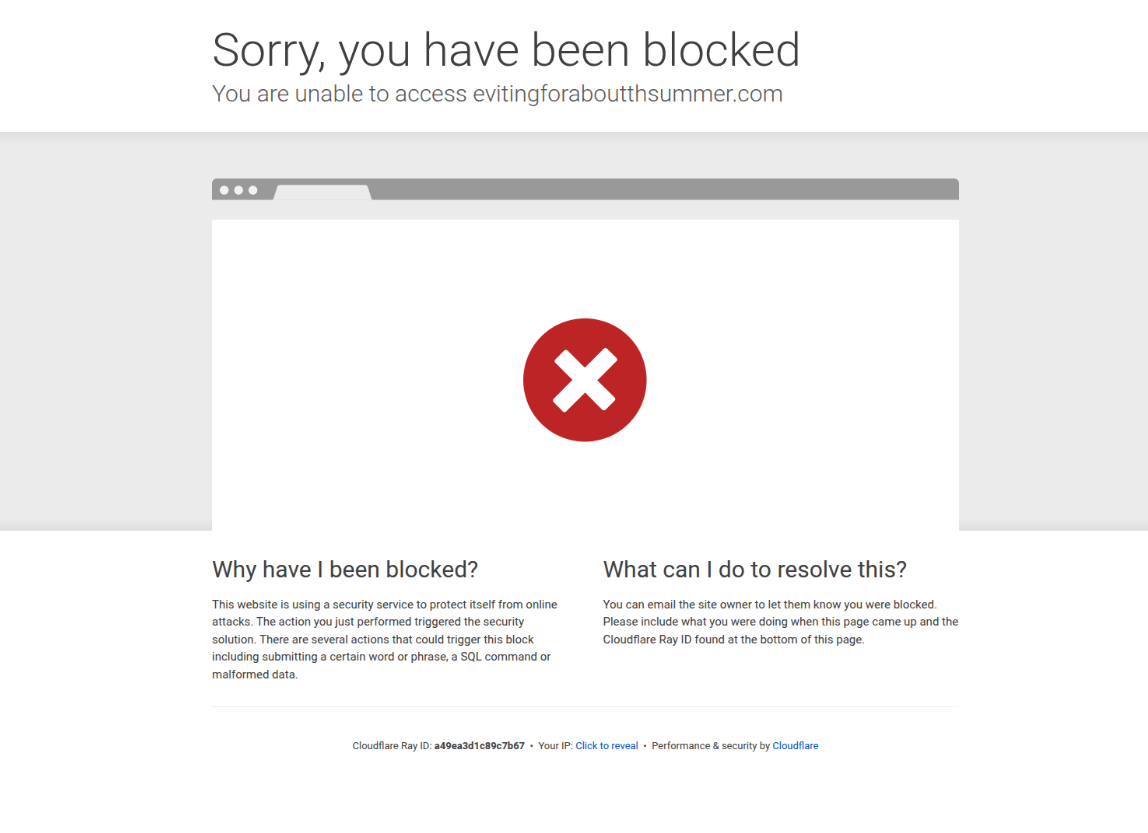
The block page comes from Cloudflare, a legitimate and widely used service that protects websites from attacks. Criminals can sign up for it too, and it lets site owners write rules about who gets in. A phishing site can be set to turn away visitors coming from data centers, from known security scanners or from certain countries, while letting everyday home and mobile connections straight through.
Think of a shop that pulls down its shutters whenever the inspector’s car pulls up, then reopens for regular customers. The scanner reports that there’s nothing to see, and the trap stays open for the people it’s meant to catch.
Why this matters to you: a link that “came back clean” or “couldn’t be reached” by a security tool isn’t proven safe. Legitimate invitation services want to be found. A link that refuses to be inspected is a warning sign in its own right.
The small things that gave it away
The technology was clever. The email itself still had plenty of tells you can spot without any tools:
- Wrong sender. Real Evite invitations are sent by Evite’s own systems, not from someone’s personal Outlook or Gmail address.
- No “To” line. A real invitation is addressed to you. This one was addressed to no one.
- Mixed messages. The headline says “RSVP update,” but the text says “You’re invited.” You can’t update an RSVP you never sent.
- No details at all. No event name, no host, no date, no location. A real invitation leads with those.
- Odd wording. “Kindly press the invitation box” isn’t how a polished consumer brand writes.
- The link doesn’t go to evite.com. Hover over the button text (or press and hold on a phone) before clicking anything.
What to do with invitations like this
- Check with the sender another way. Text or call them using a number you already have. Don’t reply to the email, since the attacker may control that inbox.
- Go to the service yourself. Open the Evite app or type evite.com into your browser. If the invitation is real, it will be waiting in your account.
- Never sign in from an invitation link. Viewing a party invitation shouldn’t require your work password. If a page asks for it, close the tab.
- Report it. Use your phishing report button or forward the message to your IT team, then delete it.
- If you already entered a password, act now. Change it immediately and call your IT provider. P3C clients: contact us right away and we’ll lock down the account, sign out every active session and check for hidden forwarding rules.
Got one from someone you know? Let them know, by phone or text. Their email account is almost certainly compromised, and they may have no idea it’s sending these out in their name.
Not sure about a message? Ask before you click.
P3C Technologies has been protecting Wisconsin businesses since 1996. Forward us anything suspicious and we’ll tell you whether it’s safe, without you ever needing to open the link.