
Last Friday, two employees at one of our clients each reported a suspicious email, about an hour apart. One was a test. One was the real thing. Both of them handled it exactly right, and that’s the whole point of this story.
Email #1: The test
The first employee got a message she wasn’t sure about. She didn’t click anything. She deleted it and asked us to take a look.
It turned out to be one of the simulated phishing emails we send to our clients’ teams as part of their security awareness training. She passed. When we told her, she said she was glad she still has her “whits.”
Email #2: The real thing
About an hour later, her coworker sent us a different email. He hadn’t opened the attachment, he’d already moved it to his Junk folder, and he wanted us to know about it.
This one was not a test. It was a fake Amazon order confirmation, and it was malicious. We confirmed it and removed it from his mailbox.
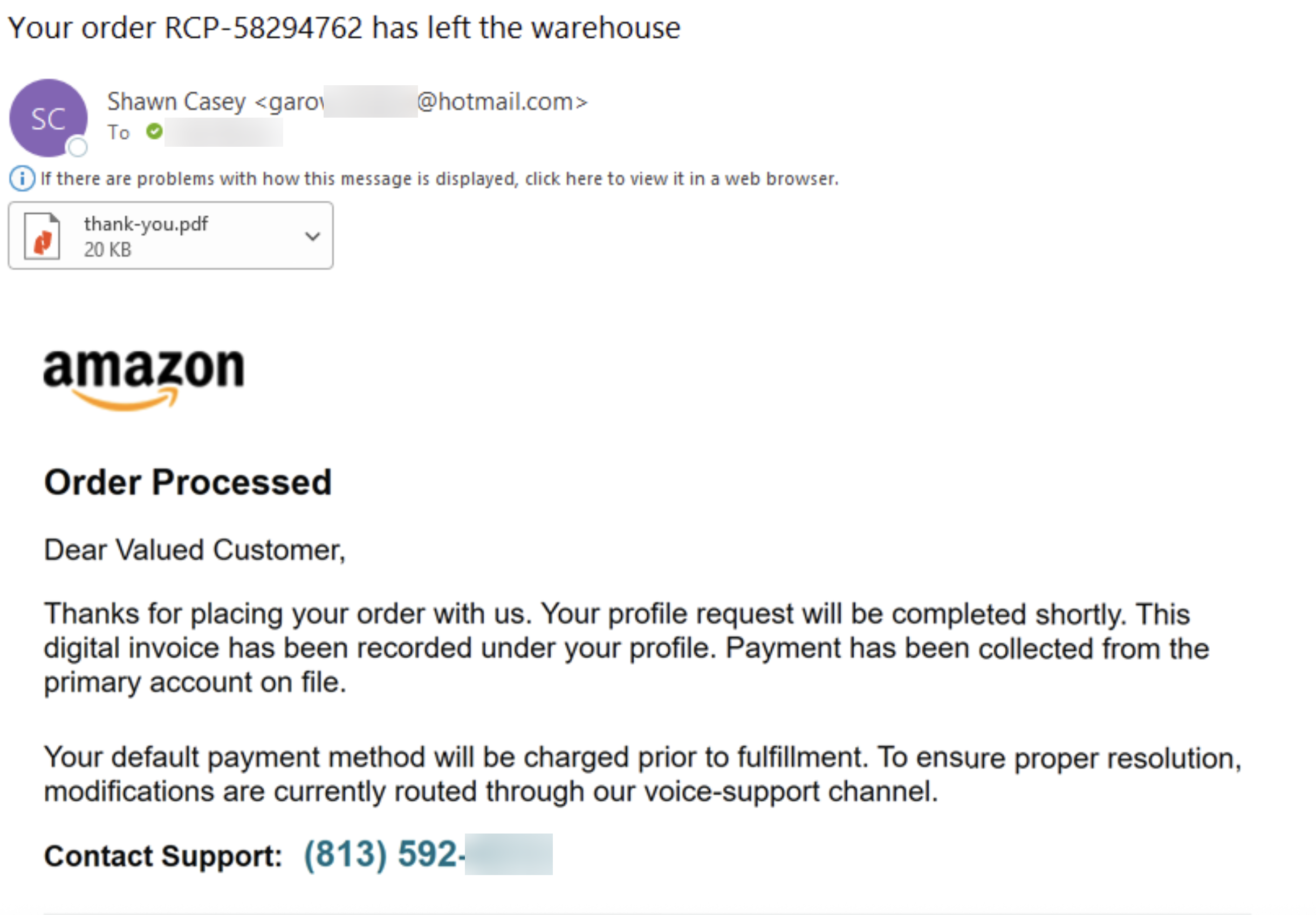
The red flags
Once you know where to look, this email gives itself away fast:
- The sender. An “Amazon” order email from a random Hotmail address, with a display name that has nothing to do with Amazon. Amazon doesn’t email you from Hotmail.
- “Dear Valued Customer.” The real Amazon knows your name.
- A made-up order number. Real Amazon order numbers don’t look like this one.
- Panic by design. “Payment has been collected from the primary account on file.” It’s written to make you react before you think.
- Vague, robotic wording. A “profile request,” a “digital invoice,” and changes “routed through our voice-support channel.” Real companies don’t talk like this.
- “Call this number.” This is the actual trap.
Why there’s no bad link
Most of us have learned to be careful about clicking links in email. Scammers know that, so this kind of attack skips the link entirely. It’s called callback phishing.
The email’s only job is to get you on the phone. Once you call, a friendly “support agent” tells you they can cancel the charge. Then they ask for your card number, your bank login, or to “connect to your computer to process the refund.” That last one is how a fake Amazon email turns into a stranger with remote control of your PC.
Because there’s no malicious link and nothing obviously dangerous to scan, emails like this can slip past email security filters. That’s exactly what happened here. Our filtering flagged it as suspicious, but not suspicious enough to stop it. The last line of defense was a person who paused and asked.
You don’t have to tell a test from the real thing
Notice that neither employee knew which email was the test. They didn’t need to. They handled both the same way, and that’s the habit we want everyone to build:
- Don’t click links or open attachments in an email you weren’t expecting.
- Don’t call phone numbers listed in a suspicious email.
- Check it yourself. Worried about an order? Open the Amazon app or type amazon.com into your browser. Never go through the email.
- Report it. P3C clients can use the Catch Phish button in Outlook or send it to support@p3ctech.com.
To both of these employees: nice work. You’re the reason this story is a short one.
Not sure about an email? Call us at 262.423.6267 or email support@p3ctech.com before you click, and before you call.