
Two people at one of our clients got an email that looked completely legitimate. They didn’t click. They called the sender, then sent it to us. That pause is the reason this story has a happy ending.
On a Monday in October, a construction company we support received a “protected message” from a vendor they work with regularly. The email used the vendor’s real name, real signature, real address, and real phone number. It was phishing, and it was built to steal email passwords.
What the email looked like
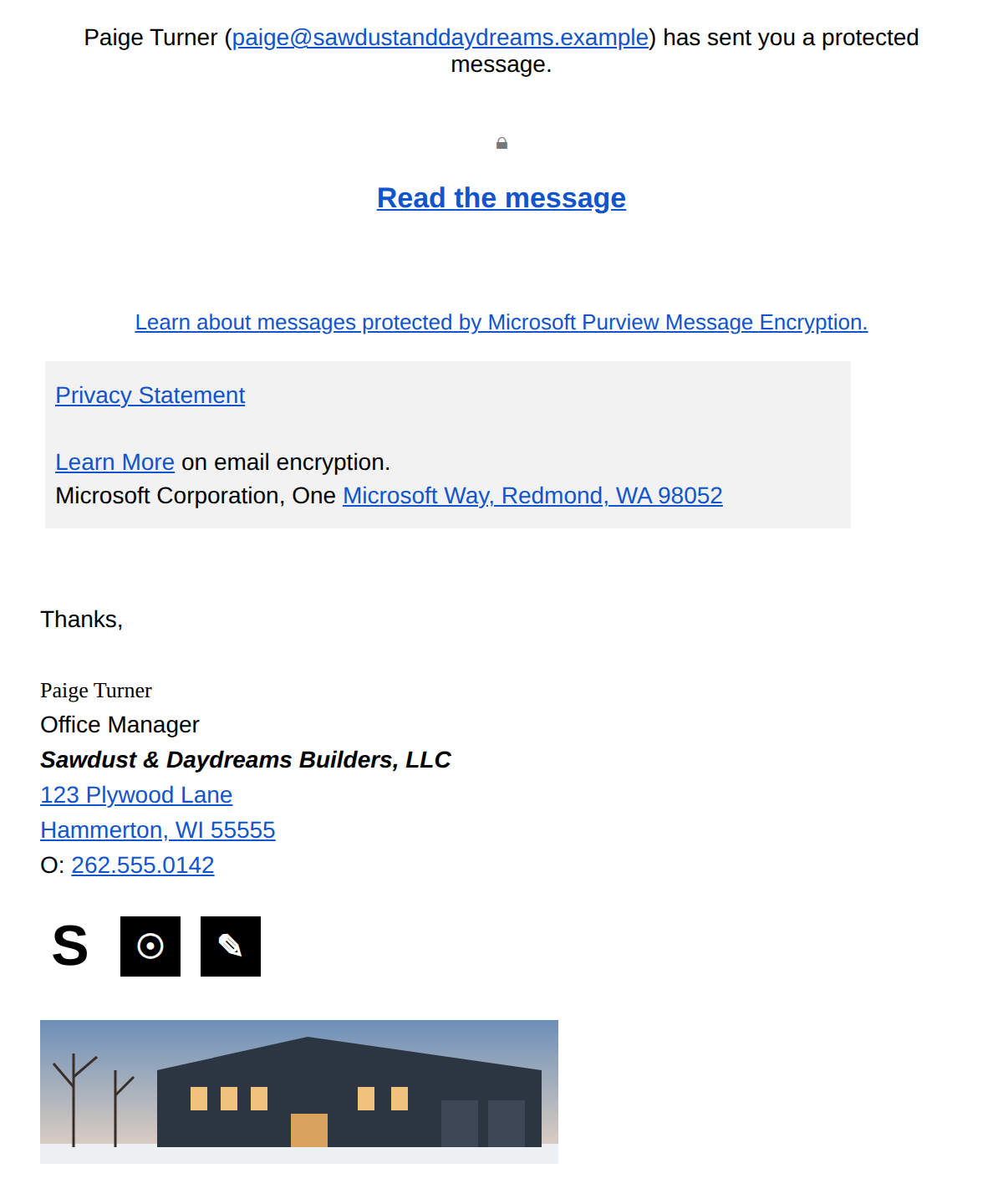
The message claimed the vendor’s office manager had sent a protected message using Microsoft Purview Message Encryption. It had a lock icon, a “Read the message” button, and the usual Microsoft fine print: privacy statement links, “Learn more about email encryption,” and Microsoft’s Redmond address at the bottom.
Under all that was the office manager’s full, genuine email signature. Name, title, street address, office phone, website, and social media links. Everything checked out.
That’s what makes this kind of attack so effective. It doesn’t come from a stranger. It comes from someone you already trust, about the kind of thing you’d expect from them.
The red flags
Once you know where to look, the email gives itself away in a few places.
- The button didn’t go to Microsoft. Real Microsoft encrypted messages always open through Microsoft’s own website. This “Read the message” button pointed to a website in Malaysia set up to look like a secure document page.
- The sender emailed herself. The message was sent from the office manager to the office manager, with everyone else hidden on BCC. That’s a classic sign of a compromised account blasting its contact list.
- Nobody answered the phone. When our client called the vendor’s real, publicly listed number, no one picked up. Odd for a busy office on a Monday, and likely because they were dealing with the fallout.
- It wanted a click before anything else. No context, no “here’s the invoice we discussed.” Just a button. Legitimate senders usually tell you what they’re sending and why.
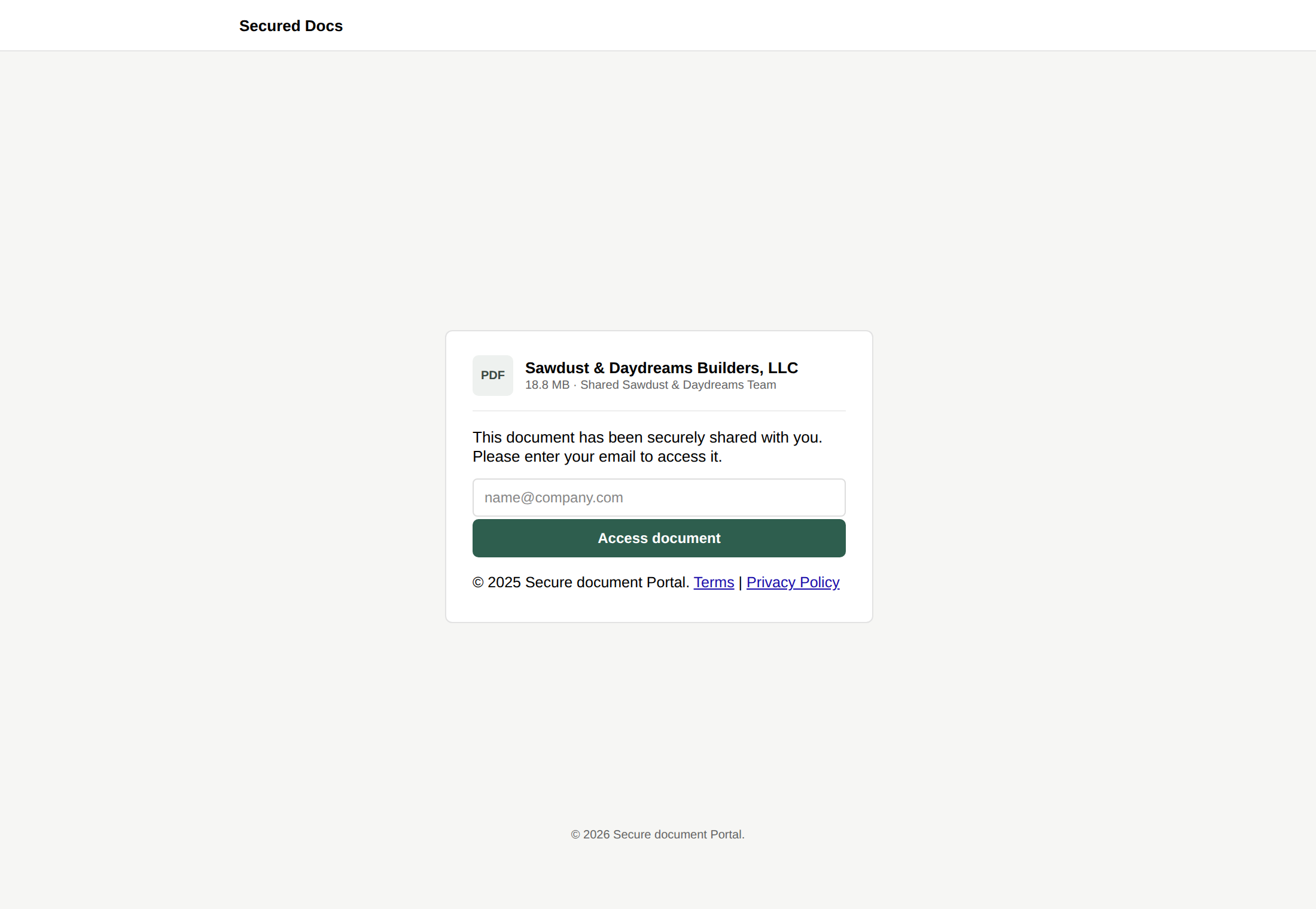
Our best read: the vendor’s email account had been hacked, and the attacker was using it to send this message to everyone in her contacts. We found the same email had already reached two of our other clients.
The heroes of this story: the users
No fancy tool saved the day here. Two people at our client did everything right, in the right order.
- They noticed. Both of them thought the email looked fishy, even though it came from a vendor they knew.
- They didn’t click. Not the button, not the links, nothing. They decided up front they weren’t opening it until someone confirmed it was safe.
- They verified using a number they already trusted. They called the vendor at the phone number listed on the vendor’s real website, not a number supplied by the email.
- They asked first. When the call went unanswered, they forwarded the email to us and asked whether it was safe.
The result: no password was entered, no account was taken over, and the attack stopped at their inbox. That’s a credential-stealing situation avoided by simple, healthy suspicion.
One more thing they taught us. They had tried the Email Analysis button in Outlook, and it said the message was “not a phishing simulation.” That only means it wasn’t one of our training tests. It does not mean an email is safe, and that tool won’t catch every real attack. They didn’t treat it as an all-clear, and neither should you.
What we did next
Within about 20 minutes of the email landing in our support queue, we had confirmed it and replied. Here’s what happened behind the scenes:
- We opened the link safely in a sandbox tool, which confirmed it was a fake login page.
- We told our client it was phishing and to delete it.
- We blocked the malicious website.
- We searched our clients’ mailboxes for other copies, and quarantined the ones that had already reached two other clients.
- We suggested our client reach the vendor through a different contact, so the vendor could lock down the hacked account.
If anyone had clicked or typed a password, we’d have reset that account right away and checked it for other damage. That’s always the offer: if you’re not sure whether you clicked something, just tell us. There’s no harm in asking.
Do what they did
- A familiar name isn’t proof. Hacked accounts send from real people with real signatures.
- Hover before you click. If a “Microsoft” button doesn’t lead to a Microsoft website, stop.
- Verify with a number you already have. Use the phone number on the company’s real website or one you’ve called before, never one in the suspicious email.
- “Not a simulation” doesn’t mean safe. Treat Email Analysis results as a hint, not a verdict.
- Report it. Forward anything suspicious to support@p3ctech.com or call us at 262.423.6267.
- Clicked already? Tell us right away. A fast password reset turns a disaster into a non-event.
The best security tool in this story was two people willing to pause and ask. Be that person.