

Happy Friday! Here’s what’s on deck this week: whether last week’s Microsoft 365 outage is worth a credit, what to do when your cyber insurance company flags your website, why we ask you to leave your computer on over the weekend, and a few more things worth knowing.
Thank you for reading. Stay safe out there.
– Brad Otto
Tip of the Week
Was Last Week’s Microsoft 365 Outage Worth a Credit?
Last week, Microsoft 365 had a major outage that hit email (Exchange Online) the hardest. It ran from about 10:20 AM CST on Thursday, November 12 to about 10:10 AM CST on Friday, November 13, nearly a full day, and some businesses were still recovering into Saturday.
Microsoft promises a certain level of uptime for Microsoft 365. When it falls short, you can ask for a service credit. Because P3C resells your licenses through Pax8, we can file the claim for you.
Keep your expectations realistic, though. The credit only covers part of your bill for the service that went down. It’s not a refund of your whole license. For Microsoft 365 Business Premium, we expect it to be a few dollars per user, so a 10-person office might see something like $20 to $60. Exact amounts vary.
Is it worth the time? For a small office, maybe not. For a larger team, or one that lost real business that day, it could be.
If you’d like us to file, email support@p3ctech.com by Thursday, December 10, 2026 with the details below. Microsoft requires proof of what your users experienced, so screenshots and notes help.
Please submit an SLA credit claim on our behalf.
• Company name:
• Number of users affected and their office location(s):
• Services we couldn’t use (Outlook/email, Teams, SharePoint, OneDrive, etc.):
• When it started and ended for us (Central Time):
• What users saw (error messages, emails not sending or arriving):
• Evidence attached (screenshots, internal notes, workarounds we tried):
• How it affected our business:
*P3C cannot promise a specific credit amount, but we’ll make the request on your behalf.
IT Vocab of the Week
Wi-Fi Access Point
A Wi-Fi access point is the device that broadcasts your wireless network so phones, laptops and other devices can connect. At home, it’s usually built into one box together with your router and firewall, often whatever your internet provider gave you.
That works fine in a house, but one box can’t cover a whole office, warehouse or multi-floor building. Larger spaces need several access points placed throughout the building, and they have to work together as one network. That way, when you walk from your desk to the conference room, your device hands off smoothly to the nearest access point instead of dropping your call.
P3C designs and installs Wi-Fi for businesses, and we recommend Ubiquiti equipment for its reliability, central management and value. If your Wi-Fi has dead spots or drops when you move around, give us a call.
Cybersecurity News
Your Cyber Insurance Flagged Your Website. Now What?
This week a client forwarded us an urgent email from their cyber insurance provider. It warned that their website looked exposed to two critical flaws in NGINX, one of the most widely used web servers in the world. The flaws, CVE-2026-123007 and CVE-2026-123633, affect how NGINX handles HTTP/2, the protocol most browsers use to load websites. The insurer’s researchers said they built a working exploit in minutes using a cheap AI model, and no login is needed to attack it.
We contacted Pantheon, our web hosting partner, the same morning. Their security team had already finished reviewing the issue by November 18. Customer sites weren’t exposed because Pantheon doesn’t use the NGINX features these flaws rely on, and the fixes are going through their regular patching process. No impact, and the client didn’t need to do anything.
If your website is hosted somewhere else, ask your host:
- Do you use NGINX anywhere in front of my site, like a web server, proxy, CDN or load balancer?
- Are you affected by CVE-2026-123007 and CVE-2026-123633, and have you patched?
- Can you confirm that in writing so I can give it to my insurer?
- If you can’t patch yet, what are you doing in the meantime?
- Who do I contact the next time an alert like this comes in?
The takeaway: AI is helping people find flaws faster, and attackers are using them faster too. Don’t ignore an alert from your insurer, and don’t panic either. Forward it to your IT provider or web host and get a written answer.
Working With P3C
Why We Ask You to Leave Your Computer On for the Weekend
A client recently asked if we could skip the Friday night reboot in our patch cycle. It’s a fair question, so here’s why it’s there. Every weekend we run a full maintenance routine:
- Friday afternoon: We create a system restore point, run a disk cleanup, and do other proactive maintenance so your computer is in top shape.
- Friday night: A pre-patch reboot clears out stuck programs and pending updates, so the new patches go in cleanly.
- Saturday night: We install the patches.
- Early Sunday morning: A final reboot finishes the install and gets you ready for Monday.
Skipping a step is the most common reason patches fail. If your computer is off for the weekend, it misses critical security updates. And if your computer missed critical security patches we’ve been told must go in right away, it’ll get them when it checks in with us on Monday morning. That means updates and reboots in the middle of your workday. Leaving your computer on for the weekend avoids all of that.
Cyber insurance providers now expect these updates to be installed and verified, and when they aren’t, it shows up as a gap in your security. A few years back, I heard a presentation by the FBI’s Assistant Director of the Cyber Division, and his message was clear: basic cyber hygiene matters, and keeping your computers patched is near the top of the list. The FBI has made the same point publicly. (Read the FBI’s remarks →)
“Do I need to stay logged in?” No. Just make sure your computer is powered on and connected to the internet, whether it’s at the office or at home. Laptop users, don’t close the lid all the way, because that puts the computer to sleep and the updates can’t run. If you’d rather not have the camera facing your room all weekend, we get it. Just leave the lid partly open.
We know leaving your computer on every weekend is a bit of a hassle. If a different schedule works better for your company, email support@p3ctech.com and we’ll talk it through. But for most offices, this routine is the best way to stay protected.
The AI and Automation Minute
Even Microsoft’s AI Needs an Exit to a Human
Last week I was on Microsoft’s support site, working with their AI-powered Support Assistant, when it broke. It hit an error, said the bot couldn’t talk for a while, and told me its owner needed to fix the problem. So I typed the obvious thing: “open a support case with an agent please.” The bot just started over with “How can I help you today?” There was no way to reach a person.
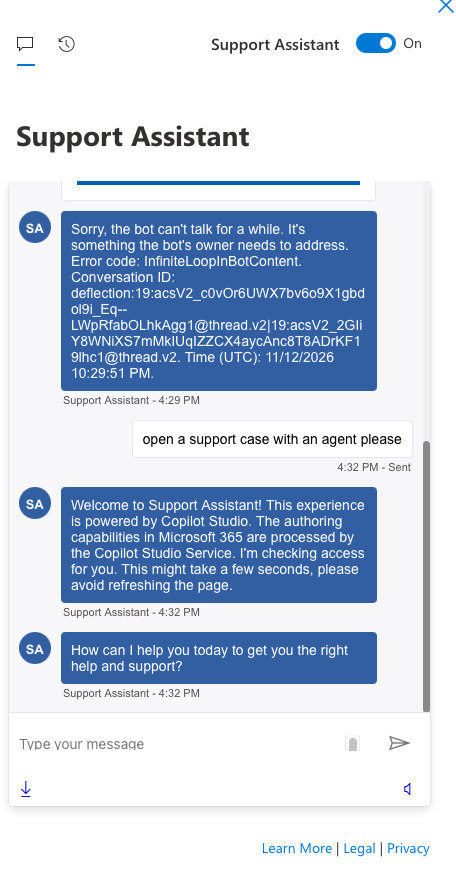
If this can happen to Microsoft, it can happen to any business putting an AI chatbot or automation in front of customers. AI agents get stuck, loop, and misunderstand people. That’s why every AI tool you deploy needs two things:
- A clear exit to a human, meaning a button, a phone number, or a way to open a ticket that always works, even when the bot doesn’t.
- Someone watching for failures, so a broken bot gets noticed and fixed quickly instead of quietly frustrating customers for days.
AI should make it easier for people to reach you, not harder.
Want help building AI and automation the right way? Visit ai.p3ctech.com, pick up my book Beyond the Prompt, or download our free AI Acceptable Use Policy.
Product of the Week
Brad’s Pick: Logitech MX Master 4 for Business
I spend most of my day with a mouse in my hand, and the MX Master line is the one I trust. I’m still using a second-generation MX Master years later, which says a lot about how well they’re built.
The new MX Master 4 for Business connects through Logitech’s Bolt USB-C receiver, and that link is fully encrypted and FIPS-compliant. That makes it the rare mouse I can recommend for comfort and for security. It tracks precisely on almost any surface, including glass. The MagSpeed wheel can fly through a long spreadsheet or move one line at a time. The quiet clicks are about 90% quieter, so your coworkers will appreciate it too.
My favorite feature is Easy-Switch, which lets one mouse jump between up to three computers with a single button. It charges over USB-C, and there’s an Actions Ring and haptic feedback you can customize in Logi Options+.
As an Amazon Associate, P3C Technologies may earn from qualifying purchases.
Featured Nonprofit
Lace Up: KMFSC’s Next Learn to Skate Session Starts Sunday
This month’s featured nonprofit is the Kettle Moraine Figure Skating Club, and their next Learn to Skate session starts this Sunday, November 22.
Learn to Skate is where most skaters begin. Classes are grouped by level, so first-timers and skaters with some experience both start where they’re comfortable and move up as they improve. It’s a great way to get the kids, or yourself, out on the ice this winter. I’ve helped run the program for years, and watching a nervous first-timer take off on their own never gets old.
- 🎓 See the Learn to Skate levels
- 📝 Step-by-step guide to signing up
- 🌐 Learn more about the club at kmfsc.org
- 🏢 Business owners: KMFSC is looking for sponsors. Learn more at sponsor.kmfsc.org.
⛸️ Register for Learn to Skate
Know a local nonprofit we should feature? Nominate a nonprofit →
- Local 501(c)(3) organizations serving our communities
- No political advocacy groups
- One nonprofit is featured for a full month
- P3C makes the final selection
🔒 Verify Your P3C Technician
Is that really P3C on the phone?
Are you on the phone with someone claiming to be from P3C Technologies and you have never met them? Don’t give them access to anything until you verify. It takes less than a minute.

You’re receiving this because you’re a valued P3C client or partner.