

Happy Friday! Here’s what’s on deck this week: why your Excel file might be carrying millions of invisible cells, scammers who got in through a remote access tool and then waited, a fake “invoice” that showed up in the mail, how to put Claude and Copilot to work on a schedule, and the charger I take on every trip.
Thank you for reading. Stay safe out there.
– Brad Otto
Tip of the week
Why is my Excel file so huge (and so slow)?
Here’s something most people don’t know: Excel remembers every cell you’ve ever formatted, even the empty ones. Click a row number and color the whole row, and you’ve just styled 16,384 cells, most of which will never hold a thing. Do that across a few thousand rows and your file starts hauling around a lot of invisible luggage.
We recently worked on a workbook that had grown to 104 MB. It held about 17,000 actual values. After we cleaned out the formatting on empty cells, it dropped to 4 MB, a 96% reduction, with nothing lost. It opened faster, saved faster, and stopped choking OneDrive sync.
The easy prevention: format your data, not the whole row. Better yet, click inside your data and press Ctrl+T to turn it into an Excel Table, which formats only what’s there and grows as you add to it.
For all the nerdy details on how to do this type of analysis yourself on a bloated workbook, see our help article: Why is my Excel file so huge and moving so slow?
Cybersecurity news
The remote access tool that let scammers in the side door
We recently took on a new client who first called us for a second opinion after a security incident. They still don’t know exactly how the attacker got in (most likely an email), but here’s what happened next: a rogue copy of ScreenConnect, a legitimate remote support tool, ended up on their system. The attacker then waited in the wings and later tried to get into software holding their customers’ data. It turned into a customer notification event with their cyber insurance carrier involved.
When they called us, before they were even a client, our first piece of advice was: call your insurance carrier right now. Many cyber policies require notice quickly, often within 72 hours, and waiting can put your coverage at risk. Check your policy, and keep your carrier’s claims hotline somewhere you can find it when your computer isn’t working.
This scam is rampant. Security firm Huntress is tracking it across multiple organizations, and it starts the same way every time: a fake tech-support call, a pop-up, a phishing email, or a bogus search result talks someone into installing remote access software or opening Windows Quick Assist. Once in, attackers hide their own copy of the tool, switch off security protections, and use the machine however they like. The cleanup is usually wiping and rebuilding the computer.
A note on ScreenConnect: P3C uses ScreenConnect for our own remote support, and our install on your workstations is legitimate. The tool isn’t the problem. An install nobody expected is. No legitimate company will contact you out of the blue asking you to install remote access software or read them a code. If that happens, hang up and call us at a number you already know. Not sure a technician is really from P3C? Verify them here.
Working with P3C
That “invoice” in the mail? Ask us before you pay it.
Earlier this week, one of our clients received a paper “Order Form” in the mail for 10 boxes of disposable gloves at $99.98 a box, just under $1,000. Nobody had ordered anything. The phone number went to a “down for maintenance, please email us” recording, and the form offered to send a W-9 or set up ACH payments by email. That last part is the real prize: your tax ID and bank details.
Here’s what one looks like. We made up the company details, since the scammers change theirs constantly anyway:
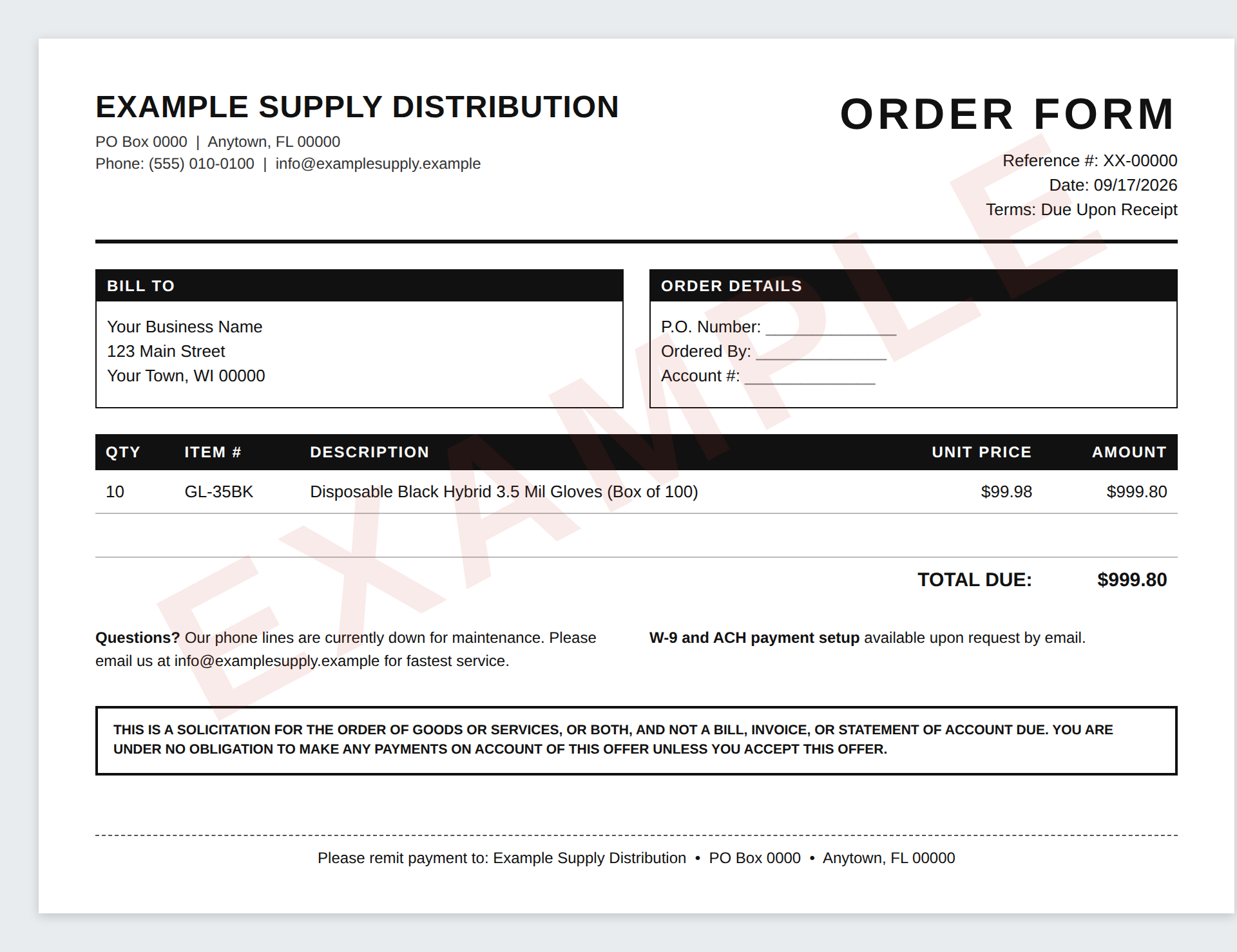
The fine print actually admits it’s a solicitation, not a bill. Paying is what “accepts” the offer. And if a box of gloves ever shows up, federal law says you can keep it without paying for it or sending it back.
The best part of this story: the person who opened it checked with us before anyone paid a dime. Once they’d emailed the scammers, the scammers had two live addresses to target, so we blocked their email domain for every P3C client, not just the one who got the letter. One question protected everyone we support.
So here’s your reminder: when something looks off, whether it’s an invoice, an email, or a phone call, forward it to support@p3ctech.com before you act on it.
See the full breakdown, with every red flag marked: How fake order form scams target small businesses
The AI and Automation Minute
Claude Projects vs. Copilot agents: put your AI on a schedule
If you retype the same background into an AI chat every morning, there’s a better way. Both Claude and Microsoft 365 Copilot let you set things up once.
Claude Projects are workspaces that keep your files, instructions, and memory together, so every chat inside starts out already knowing the context. (Fun fact: this newsletter is built in one.)
Copilot agents, built with Agent Builder in Microsoft 365 Copilot, are custom assistants you describe in plain English. They can pull from your SharePoint, Teams, Outlook, and OneDrive.
How they’re alike: both give the AI standing instructions and reference material, so you stop re-explaining yourself. The difference is where they live. Copilot agents sit inside your Microsoft 365 data. Claude Projects are a workspace you fill, plus connectors to things like your email and calendar.
Now the fun part: scheduling. Both can run work on a timer. In Claude, describe the task and how often, like “Every Monday at 8 AM, summarize my calendar and flag anything I need to prep for,” and it runs in the cloud even when your computer is asleep. In Copilot, Agent Builder lets you create a workflow that prompts your agent hourly, daily, weekly, monthly, or yearly. Good starters: a Monday “what’s on my plate” briefing, a Friday project recap, or a weekly industry-news roundup.
A licensing note: what your Copilot agents can do depends on your license. Free Copilot Chat and the paid Microsoft 365 Copilot license aren’t the same thing (we covered the difference in Issue #7). Scheduled tasks in Claude need a paid Claude plan. Not sure which fits your team? Just ask.
Everything we’re building lives at ai.p3ctech.com, including my book Beyond the Prompt, a free AI Acceptable Use Policy you can download and adapt for your team, and our upcoming AI and automation events.
Product of the Week
What Brad packs for the road: a 140W travel charger
A few weeks back in Issue #4, I shared the heavy-duty Anker charger that lives on my desk: 200 watts of power and four USB-C ports. So what do I take on a trip? This nice little Anker charging block with 140 watts and three USB-C ports. It charges my laptop, iPhone, Apple Watch, and then some when I need a quick top-up.
Don’t forget the cables. These braided USB-C cables are rated for 240 watts and hold up better to being stuffed in a bag and abused on the road. Full disclosure: I’m still using my 100W cables, and they work fine. But if you’re buying new, get the 240W ones. They’re what let a 140W charger deliver its full power to a laptop, and they’ll cover whatever you plug in next.
See the Anker 140W travel charger →
Get the 240W braided USB-C cables →
These are Amazon affiliate links. Your price is the same either way — we only recommend gear we actually use.

You’re receiving this because you’re a valued P3C client or partner.